



Rated 5 out of
5
by
Momofthreekids from
Best home small business printer out there
Absolutely the best printer I have ever purchased. I own a small business and I’ve had an Epson 2400 for the past year and it is absolutely awful. The colors are dull and incorrect and the printing quality was awful. This printer is phenomenal. It is quick and the quality is unbelievable. The colors are vibrant and consistent and I am so very happy.
Date published: 2026-05-08
Rated 5 out of
5
by
amorphousrock_911 from
Perfect all-in-one printer for a home office!
[This review was collected as part of a promotion.] As the Training Coordinator for my entire office, of nearly 300 people, my duties don't take a day off just because I'm working from home. Enter the Brother INKvestment 4355 all-in-one printer. Now, I can enjoy working from my home office without giving up the capabilities of the equipment at the office. Whether faxing updated forms, scanning certificates, accessing documents from the cloud, or printing hundreds of pages of presentation slides, this printer has tackled them all - without breaking a sweat... It even nailed printing 4x6 gloss photos. Best of all, this printer was clearly thoughtfully designed, with the end use in mind. From having nothing to turn on, open, or fold out before you can print remotely, allowing for truly remote printing, to a paper tray that can hold enough sheets to handle a real print job without needing to reload the paper repeatedly. This is my first Brother printer and I'm thoroughly impressed with the brand and pleased with this printer. Although this was my first Brother product, I guarantee it won't be my last!
Date published: 2025-10-20
Rated 5 out of
5
by
mera_sal_1704 from
Perfect all-in-one printer for anyone working from
[This review was collected as part of a promotion.] I work from home, so having a reliable printer is a must. The Brother INKvestment 4355 has been super convenient for everyday printing, scanning, and copying. Setup was easy, and it connects quickly to Wi-Fi and my laptop without issues. The print quality is sharp for both documents and color prints, and I really appreciate how long the ink lasts—it definitely lives up to the “INKvestment” name. It’s compact enough not to take up too much desk space, and I like that it has a manual feed slot for thicker paper when I need it. Overall, it’s a great all-in-one printer for a home office setup.
Date published: 2025-10-15
Rated 5 out of
5
by
nlopez88_9059 from
Reliable, Easy-to-Use Printer That Gets the Job Do
[This review was collected as part of a promotion.] I’ve been using the Brother INvestment 4355 Wireless Color Inkjet All-in-One Printer, and it has quickly become one of the most dependable devices in my home office. The setup was simple, and connecting it to Wi-Fi only took a few minutes. The 1.8-inch color display makes navigation super straightforward, and I love that it has a manual feed slot for specialty paper when I need to print something different, like envelopes or cardstock.
The print quality is excellent—sharp text and vibrant color every time. It’s also surprisingly quiet compared to other printers I’ve owned, which is a big plus when I’m working late. Scanning and copying are seamless, and having everything in one device saves me a ton of space.
Overall, this is a reliable, budget-friendly printer that handles everyday printing needs with ease. Whether it’s documents, photos, or quick copies, this printer doesn’t disappoint. Highly recommend for anyone who wants solid performance without hassle!
Date published: 2025-09-23
Rated 5 out of
5
by
faic1_8422 from
Good so far
[This review was collected as part of a promotion.] has been such a reliable printer for me. Setup was quick and easy, and the wireless connection worked right away with both my laptop and phone, which makes printing super convenient. The print quality is impressive with sharp text and bright, vibrant colors that really stand out on the page. I also like that it automatically prints on both sides, which saves paper and time. The 150 sheet tray holds plenty of paper so I don’t have to reload often, and the extra manual feed slot is great for things like envelopes or thicker sheets. It runs quietly, prints fast, and I haven’t had any paper jams so far. The ink efficiency is another big plus it lasts longer than I expected, so I don’t feel like I’m constantly replacing cartridges.
Date published: 2025-09-22
Rated 5 out of
5
by
nikkif95_3681 from
Impressive. Quick. Quality.
[This review was collected as part of a promotion.] This color copier has many different functions, which make it one well rounded device! There is ample paper storage. The color of the ink is bright and the quality is amazing. It connects quickly to the computer and give fast, quality copies!
Date published: 2025-09-21
Rated 5 out of
5
by
kinbhav_8814 from
Useful
[This review was collected as part of a promotion.] This printer is good . Printing quality is Awesome , not making too much noise . Ink effect is good with printing no over laping. Internet connection is easy to use.
Date published: 2025-09-10
Rated 5 out of
5
by
chrisc117_4041 from
Great printer for the home
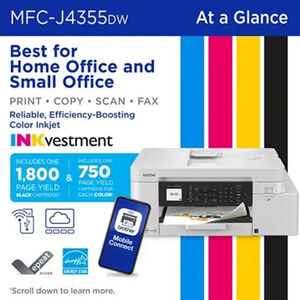
[This review was collected as part of a promotion.] So far an awesome printer! Come with starter ink but we’re talking 1800 page black and 750 page color cartridges. That’s unheard of with other brands. Simple to set up, just scan the QR code and follow the instructions. They are very easy and simple to follow. You have to register but it looks like you can manually set up on the machine without the app but I suspect it’s not as easy as the app. Takes maybe 15 minutes start to finish. I took a picture of my shoe and printed it full page (see image) and it looks amazing. The colors are spot on and this full page of color took about a minute and a half. I hope it lasts as long as my last Brother printer which I’ve had about 8 years and is still going strong. It’s just getting repurposed to the kids room.
Date published: 2025-09-10
Rated 5 out of
5
by
lovesugarshow_9749 from
Thumbs up fot me!
[This review was collected as part of a promotion.] I am enjoying my new Brother INKvestment Tank MFC-J4335DW All-in-One Colour Inkjet Printer. The setup was easy. 15 minute set up! No problem finding it on Mac Mini or Lenovo Laptop! The quality of the print is clear with no smears! I printed on 4x6 postcards, envelopes and legal size paper, not one problem! Thank you for making well made printer.
Date published: 2025-09-10
Rated 4 out of
5
by
Anonymous from
Efficient
[This review was collected as part of a promotion.] Print quality seems good so far. Connects to WiFi. I’d say the ink is working well also. Very convenient to have in the office so I don’t need to make trips to printing shops.
Date published: 2025-10-08
Rated 3 out of
5
by
cubitus81_1229 from
No touch screen. Setup is not straightforward
[This review was collected as part of a promotion.] Wireless setup is not straightforward. Also, the screen is small and not a touch screen, making it difficult to use. With a bigger touch screen, you do not need so many buttons on the printer. Size is compact.
Date published: 2025-10-05
Rated 1 out of
5
by
Dave from
Not a Good Printer
The worst printer I have ever purchased. First off, the red and yellow ink cartridges where leaking in the unopened plastic they came in. When trying to set up the printer to use the USB connection it was not ever able to be recognized by the software from the download page on the web site at Brother. I have two other Brother printers that were far easier to set up including a brother color laser printer with both USB and wireless. I have used Brother printers for over 20 years, and this was a replacement for an MFC 490CW.
Date published: 2026-06-14
Rated 1 out of
5
by
bet14 from
not liking it had better luck with other printers
have to use their very expensive ink and there is a small piece of paper stuck an d no way to get it out
Date published: 2025-11-03