



Rated 5 out of
5
by
ATHESPORT from
My Canon Printer
Easy to set up and use. Nice quality copies. Good for home use.
Date published: 2026-03-24
Rated 5 out of
5
by
Sabato from
Mr. D
After the first printer arrived and very disappointed with the operation, I returned same and ordered TS 6530 which is far more superior to the returned item.
Date published: 2026-01-18
Rated 5 out of
5
by
mavarick from
Pixma wireless printer TS6520
Great price, great printer, fast shipping, never had to leave the house! This printer was super easy to set up for my laptop and to print right from my phone. This is my second Cannon printer and I'm always happy with the quality.
Date published: 2026-01-12
Rated 5 out of
5
by
Jenislucky from
Amazing printer!!!
I received a HUT251058535 Canon Printer to try and send back my feedback. Let me first day that I was excited and nervous as I'm not very computer savy!!! The day it arrived i was excited to set it up right away!! IT WAS SO EASY!!! Set up was a breeze!!! The prompts as ti what to do next showed up right on the printer screen. I thought there's no way it could be this easy....I downloaded the app and my phone found the printer right away!!! I anxiously printed something and by the time I walked over to where I had the printer... it was there... BEAUTIFUL!!! The speed and quality are TERRIFIC!!! This printer is lovely!!!
Date published: 2026-01-03
Rated 5 out of
5
by
Cathy J N from
great printer
I was looking for a basic printer to replace my old one and this one had many more features than I was looking for but am happy I purchased it. It was easy to set up, and I didn't experience any issues with connecting to my wi-fi. Print quality is good and I love having the feature for two side printing as well as scanning.
Date published: 2025-12-29
Rated 5 out of
5
by
Marina Brooklyn Brew Cfe from
So easy to use in mobile
We had an opportunity to give an impartial review. We were sent a free printer / scanner and asked for an honest review. I will be as forthcoming as possible. I was very happy with the functionality of the printing and scanning capabilities. I have to admit I was a bit concerned at first as it was much more compact than my HP that I currently use for Home & Small Business. I thought that the quality or functionality may suffer because of the size. I was wrong. Let’s start out with the setup. The setup was extremely easy and all I had to do on my phone was download the cannon print app, and push 1 button on the printer and I was automatically connected to the system I found it much easier than setting up my previous printer / scanner which took me about 20 mins to set up. I also found it easy to set up the printer on my laptop which is a windows based system. I was able to download the app from the Microsoft store and establish a connection with similar ease as my phone. What I was really impressed with was the quality and depth of the scanned images. The scans were very high resolution and the print quality was fantastic. The speed of the print was exceptional and the dual sided printing was super simple, automated, and helped me save money on paper. I would highly recommend this system to people looking for high quality, ease of use, and for its slim compact fit that can go even in the tiniest of offices. I always remember cannon for cameras, now they will be first on my list when it comes to printing and scanning. I also found their printing plans to be more competitive than the other brands out there. Give them a try!
Date published: 2025-12-17
Rated 5 out of
5
by
Jen123 from
Great portable wireless printer
I received a free sample of the wireless printer to review. It was pretty easy to install and set it up. I tried it from my phone and laptop. Finding and connecting it to both devices was smooth and easy. Overall I like the quality of the printer. I printed a lot of colored images together with black and white ones. It would be nice to have printing speed a little bit higher, but for everyday home tasks it's fine.
Date published: 2025-12-16
Rated 5 out of
5
by
Printscan from
Great for Home Offices
I was thrilled with this gifted Canon printer! The set up was extremely user friendly and took less than 20 minutes. This model is wireless, quiet and prints with excellent color. The printer is a great size and doesn’t take up too much space in my small home office. I was surprised by the quiet and fast printing speed. I was able to print from my phone, with ease, from various rooms in my home. I used the printer for several different types of images. I printed some photos (using photo paper), and the images were so vibrant and high quality. The colors were true to life and seemed to jump off the paper. The printer came with two ink cartridges that were also very easy to install. I’ve owned a Canon printer previously, but I’ve never had a scanner. I had no problem using the scanner without reading the instructions. The color quality for scanning was the same as printing, perfect!! Although I was lucky enough to receive this machine for free, I would absolutely purchase it because it’s great value. The printer has two-sided printing which is extremely convenient and helps to save printer paper. Because I have two children in middle school with frequent assignments, reports and projects this will be beneficial them as well. I was able to give them something to print, and they also completed the task with ease. If you’re searching for a compact and efficient addition to a home office, this is your best option.
Date published: 2025-12-12
Rated 5 out of
5
by
Batch34 from
Easy to use and setup
I received a free printer in exchange for this review; it arrived quickly and expediently. I set up the printer at my private desk and after connecting the power cable proceeded to set it up. The wireless setup was easy and after downloading the software package from the official site all I had to do was run the installer and everything was done automatically. I used the wireless printing function from my laptop on numerous occasions, and it was simple and streamlined. The print quality was exceptional and the speed was terrific. I used the printer to make both single sided and double-sided pages. I found the double-sided printing saved time and money in regard to paper usage and expediency. I would recommend this printer to friends and family.
Date published: 2025-12-12
Rated 5 out of
5
by
Canon Rocks from
Easy Wireless Set-Up
I’m genuinely grateful for the opportunity to review this product using the complimentary sample I received. The experience was fantastic. The wireless printing with this printer was seamless and hassle-free. I quickly found the available printer on my smartphone without any issues. The setup process was straightforward and didn’t require much effort. What I appreciated the most was the attention to detail in the packaging. The ink cartridges and the printer itself were meticulously nestled and packaged, giving the impression of high-quality craftsmanship. This printer meets my specific needs for home printing, which involves printing approximately 10 pages per week. I generally don’t use duplex printing. I’ve used the scanner capability, and it works fine. Also, sending documents or other straightforward tasks is easy.
Date published: 2025-12-10
Rated 5 out of
5
by
jamez629 from
Great Printer with Lots of Useful Features for a Reasonable Price!
The Canon PIXMA TS6520 is a good budget-friendly all-in-one printer for everyday home use. The key functionality it has is: printing (black & white and color), scanning, and copying. The print quality is pretty solid for most documents and even some light photo printing. I found the setup process to be quick and straightforward. I was able to easily connect to my home WiFi and wirelessly printing from my phone or laptop was simple. I also like its compact size which makes it easy to keep in my home office and I really liked the ability to have it do automatic double-sided printing.
That said, it definitely has some limitations. The build feels a bit lightweight with almost all plastic components, and the print speed isn’t fast which really only matters when printing larger documents. Wireless connectivity worked fine most of the time, but I’ve run into a few moments where it randomly disconnects or needs to be re-added to my network. While I didn’t run out of ink during my testing, I could see this printer using a lot of ink if you print a lot of color documents or photos.
Overall, I would say this printer is a good value as long as your printing needs are light. It’s great for occasional documents, schoolwork, forms, and the occasional photo, but probably not the right choice if you need something heavy-duty or fast. For basic home use, though, it does the job well and I would recommend this printer to others!
Date published: 2025-12-10
Rated 5 out of
5
by
Jon Surveys from
I love this printer
I received this Canon printer for free in an exchange for my review. This is by far the best printer I have ever owned. It's sleek and compact and works great. The setup is extremely easy and I was able to have it connected within minutes to my Wifi connection. The instructions were great and easy to follow and Canon has always been my favorite printer of choice. Once it was connected I was able to print from my phone and laptop with ease in seconds. I use this printer for my personal and business needs. I love the printer quality and speed as I'm able to print documents very quickly. I highly recommend this unit for everyone's everyday use and or business needs.
Date published: 2025-12-08
Rated 5 out of
5
by
Happy retired person from
Easy to install
I installed - 1 -2-3 onto a win7 PC I built years ago. Re wireless network - be sure to use the 2.4GHz and the admin password for the 2.4Ghz numb nuts.... lol Also a breeze putting in on my old PC....prints like a dream - more ink than other cartridges AND supports .... I am very grateful Canon. Thank you
Date published: 2025-11-06
Rated 4 out of
5
by
MARQ from
Good Printer for Occasional Printing and Copying
For participation in giving this review, I was offered to keep the printer after giving my thoughts.
My initial thoughts when I first opened the box was that the printer was nice a compact especially knowing that the printer can print in both simplex and duplex modes, it is also a scanner as well.
Since I'm an I.T. person, of course I didn't initially read the set up instructions, so I tried to do the set up on the fly. However, I did run into an issue and had to refer back to the instructions. Once I did that, the set up was pretty easy.
After getting the printer set up, I did some printing from both my laptop and phone. My main issue with the printer was the speed. I will admit that I'm not use to printing with an ink jet printer. I use Laser printers, both B&W and Color all the time and expected the printer to be faster than it was. I would say for users who printer on ocassion, this might be fine, but for power users this would most likely not work for then.
As for print quality, I printed a few coloe pages and was not that impressed with the quality. This was not full color graphics, but some text within the document. Maybe it is just that I'm use to a color laser printer and the better quality. Maybe for picture on photo paper, this might be a good printer.
I do work from home at least one day a week and do some printing. Usually when I print, it is an urgent need. If I had to wait to have this printer printer let's say a 10-20 page document, I think I would get frustrated waiting for the pages to print, especially if I needed them immediately.
Since I normally scan documents with my phone, the one thing that this printer offers it has a flat top scanner and I would be able to scan document more easily.
Date published: 2025-12-18
Rated 4 out of
5
by
DrCry from
Really good for the cost!
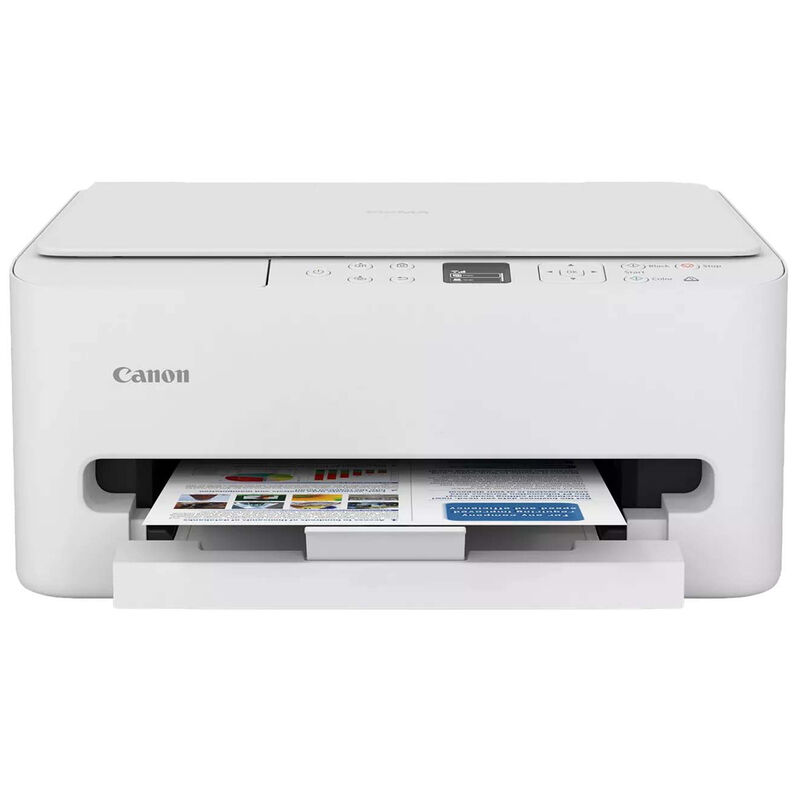
The unit was really easy to get out of the box, and it looks great. I’ve never owned a white printer printer, and it looks awesome on my white cabinet (I should mention that I received this printer free in exchange for this review). It is so much smaller (and lighter!) than my 7-year-old HP OfficeJet that it is replacing (which I had very few complaints about). My initial negative reaction is the door at the back of the unit, which would seem to be difficult to access in order to clear jams since it is against the wall, but I’ll have to wait and see on that (actually, I hope I never have to find out).
As I started to figure out the set up, I found it odd that it is not a touchscreen display (as my past printers have been). During set up, I entered the website address on my computer, and I got access to the information easily enough. Everything was clear enough until the instruction to “Load A4 or letter sized plain paper in the cassette and press OK.” I found that it is not possible to just pull open the drawer that was obvious.
However, after examining the unit for a couple of minutes, I realized that I was pulling on the wrong drawer. There are two drawers on top of each other, the top one being the receiver for the paper after it is printed (which also pulls out), and I needed the one underneath. This is not very clear in the instructions (or the picture). Or maybe I’m just stupid.
Since it’s obvious how to load the paper to anyone who’s ever used a printer or copier before, I loaded it and closed it. However, there was then the instruction on the printer that said "do you want to enable automatic, firmware updates”, which was not found in the following update instruction. Going back through the "load paper" instructions, I found this at the end of that set. Very odd that this would be under that set of instructions (maybe the designers just thought it was too obvious to include on its own set of instructions).
I must say that the biggest aggravation on the website is the fact that there are two arrows pointing to the right, one which takes you through the steps on each major instruction, and the bigger one that takes you to each major instruction. I found that I was always hitting the big one on the far right, and it was confusing when I was just trying to go through the individual steps.
Downloading the software was simple enough. The only oddity is that my Mac gave me a message that said “‘ESPController’ was now able to run in the background”. I was OK when it said "Software from Cannon" was running in the background, but the name of “ESPController” sounds a little daunting.
The computer automatically went into setup mode, but after waiting 10 minutes while the Canon Print Application said "setting up. Please wait…”, I ended up Force Quitting the application. After pushing some buttons (no idea what I did), I found the “Master Setup” application was already open, which then ran for a couple minutes and came to the “Add Printer” dialogue box. The remainder of the set up process went easily, and the Master Setup App opened the same Canon Print App when finished. Very confusing how that happened.
The rest of the setup was seamless, with a single set up making it possible to print wirelessly from any of my computers or iPhones. For an inkjet printer in my home office, the printer has quite good print quality, the print speed is decent, and it duplexes very well (which is very nice on a lower end printer). Printing out an 8 x 10 photo on photo paper was quite impressive. The printer app (at least on a Mac) is clear and easy to use (and even did a firmware update without fuss).
Overall, I would have to say that this is quite a fine printer for the money. The only minor complaints I have is 1) getting to the door in the back (should there ever be a paper jam, which I did not encounter), and 2) the lack of a way to feed a single piece of paper without opening the paper drawer (I do a lot of double-sided printing from different apps or files, so I have to open the paper drawer, put in the one side that I've already printed - BTW the print side is down - and then print). While this this is admittedly a minor inconvenience, it is the only feature in which my HP OfficeJet prevailed. These minor issues aside, it is clear that this is a fine printer for any home or small office that needs the occasional color printing.
Date published: 2025-12-17
Rated 4 out of
5
by
SBROWN from
Nice Printer
I received a free printer in exchange for agreeing to write an honest review. Upon receiving the package, I found the installation process to be very easy. My goal was to use the wireless/bluetooth feature for printing; so I would not need to worry about downloading drivers to print from my laptop. Once I downloaded the Canon app to my cellphone and connected the printer to my home WiF, printing documents from my cell phone was a piece of cake. My husband was even able to print from his cellphone. Overall, the printer works great! The quality and speed are top notch, that meets my expectations. I have the printer installed in my home office. So far, I’ve used the single and double sided printer features, along with the copying feature. I have not figured out how to use the scanner yet, though. The only issue I have encountered is, I’m not able to detect the printer (wirelessly) from my company laptop. I’m not sure if that’s because of company policy or not.
Date published: 2025-12-16
Rated 4 out of
5
by
ElanaK from
Easy and Sleek
I received a free printer to test and review. Overall this printer was very easy to set up and use. I have prior experience with wireless printing so the set up was pretty familiar and standard. There was straightforward instructions on downloading and installing the app from there the app had step by step instructions on how to install the ink and start printing. The printing from the phone is very simple and prints are sent to the printer within seconds and are completed within seconds.
The only trouble and lack of information I found annoying was the instructions to setup and use a desktop computer. If there was instructions in the box about this it wasn’t obvious and I had already discarded the paper. However, googling the model easily led me to the information about installing the print driver. Since this was a work computer I did have to get IT involved but wasn’t too complex. I am currently using this for personal and work and so far has met all my needs.
The design is very sleek and aesthetically pleasing and not an eye sore which I like. I wouldn’t say it’s small but it’s no frill and doesn’t have unnecessary bulk.
Date published: 2025-12-09
Rated 3 out of
5
by
Sandra Kaye Hergert from
Prints well but not made very sturdy
The last Canon printer MG7120 was made so much better, I loved how I could keep the paper tray closed and it would pop open when I hit print! This one is cheaply made, like a childs toy. It looks nice and compact as I have my office in my living room. Does all I need it to do. Price was very affordable for me, just cheaper made like most of today's items. No fault of company just the economy in general.
Date published: 2025-12-19
Rated 1 out of
5
by
nere11 from
Horrible connection
It will not connect to the internet or the app for the life of me. I look online and everyone is having the same issues.
Date published: 2025-10-13