
6LcHdGgbAAAAAH1sN0CXxmXn3OYf0cfmvUSPtbdp

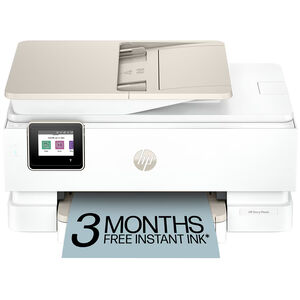
HP Envy Photo 7975 All-in-One Printer

MODEL:

ENVY7975

MPN:

B63K3A#B1H
5 out of 5 Customer Rating
HP Envy Photo 7975 All-in-One Printer is rated 4.2 out of 5 by 47.
  • y_2026, m_5, d_7, h_14
  • bvseo_bulk, prod_bvrr, vn_bulk_3.0.43
  • cp_1, bvpage1
  • co_hasreviews, tv_1, tr_46
  • loc_en_US, sid_ENVY7975, prod, sort_[SortEntry(order=RATING, direction=DESCENDING), SortEntry(order=SUBMISSION_TIME, direction=DESCENDING)]
  • clientName_pcrichardson
  • bvseo_sdk, dw_cartridge, 18.2.0, p_sdk_3.2.0
  • CLOUD, getAggregateRating, 11ms
  • reviews, product
$159.99 Price reduced from $239.99 to
Save $80 (33% Off)
Low Price Guarantee

BUY NOW, PAY LATER WITH . See if you qualify


Delivery & Pickup Options

Delivery to 43215 Change
Parcel Delivery
Will ship approximately 05/10/26 FREE
Learn More

About this Item

Printing Technology
Inkjet
Multifunction
Multi-Function Printer
Maximum Print Resolution
1,200 X 1,200 DPI
Ink Cartridge System
Dual Cartridges
Print Speed
15.0 Pages Per Minute B&W 10.0 Pages Per Minute Color
Buffer Memory
256 MB Buffer
Paper Feed
Front Paper Feed
Maximum Paper Width
8.5" Max Paper Width
Paper Tray Capacity
125 Sheet Capacity
Envelope Printing
Yes
Ports
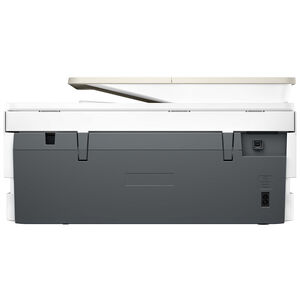
Ethernet and USB Ports
Wireless Printing
802.11n Wireless
Document Feed Capacity
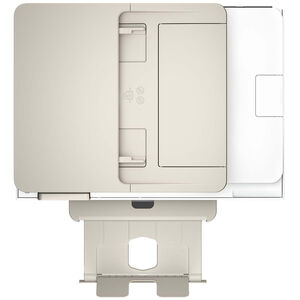
35 Sheets
Copy Resolution
600 X 600 DPI Copy Resolution
Color Scanning
Yes
LCD Previewer
Yes
Included Software
HP Print
System Requirements
PC: Windows 11, Windows 10 32 bit or 64 bit; 2 GB available hard disk space, Microsoft Internet Explorer or Edge; Internet connection; Mac: macOS 15 Sequoia, macOS 14 Sonoma, macOS 13 Ventura; 2 GB HD; Internet required
Dimensions
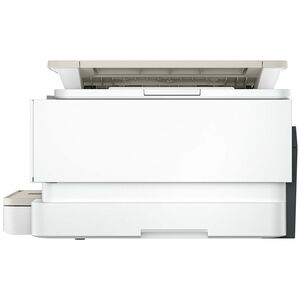
18.1(w) X 9.1(h) X 15.0(d)
Shipping Weight
18 lbs
Rated 5 out of 5 by from HP 7579 I like the printer, but I am having problems with some of the programs I am using with it.(Word and PDF Pro)
Date published: 2026-04-27
Rated 5 out of 5 by from A true winner for me! It is smooth, quiet and efficient with quick response despite my WIFi itself not being very strong.
Date published: 2026-04-21
Rated 5 out of 5 by from Best printer I've ever owned This is this is the best printer I've ever owned. I really like the document feeder and even though I don't have a fax machine I am able to fax through this printer. The print quality is excellent.
Date published: 2026-04-19
Rated 5 out of 5 by from Needs work AI set-up worked great. Chat line was not so great. Needed better instructions, If you need to click a icon twice say so.
Date published: 2026-04-03
Rated 5 out of 5 by from Love it Awesome printer. Great quality prints.
Date published: 2026-03-25
Rated 5 out of 5 by from Change is good ! New computer, new printer.
Date published: 2026-02-20
Rated 5 out of 5 by from Great printer This printer is great for printing, scanning, and copying. You can even print pictures. Each page it prints is clear and easy to read.
Date published: 2026-02-12
Rated 5 out of 5 by from Excellence So far, it has been excellent!
Date published: 2026-02-11
Rated 5 out of 5 by from new printer HP printer are getting better
Date published: 2026-02-11
Rated 5 out of 5 by from Efficient inkjet printer [This review was collected as part of a promotion.] This is a very good inkjet printer. It’s very efficient and was easy to install and connect to WiFi very easily. The quality of the printer is very good. We love it. It has been working very well for the last few months. I hope the ink does not dry up. If needed I will write another review after 6 months.
Date published: 2026-02-05
Rated 5 out of 5 by from Efficient printer [This review was collected as part of a promotion.] Great printer all in one printer. It’s efficient at printing large images and graphics. I got more ink through the HP subscription. Through WiFi, it can detect ink or paper levels for automatic refills. It’s large, so you need some extra space on a desk. It’s easy to use; just navigate through the screen or print straight from a computer. Everything is straightforward on the HP Envy photo 7975.
Date published: 2026-02-05
Rated 5 out of 5 by from Printer HP Envy Photo 7975 AIO Printer Love my new printer it prints amazing in color and also in black and white
Date published: 2026-02-03
Rated 5 out of 5 by from Quality printing [This review was collected as part of a promotion.] I have been using the HP Envy Photo 7975 and I'm very impressed with how easy I set it p and printed my documents. Scanning was also very nitid and clear. It a big win that I set it up to my wifi.
Date published: 2026-01-29
Rated 5 out of 5 by from Quality print [This review was collected as part of a promotion.] I purchased the HP Envy 7975 to upgrade my current printer for my craft business. I wanted a printer with a better print quality for colored pictures. I must admit, the quality is amazing! My pictures come out professionally done! I love how I can print transfers, photos, stickers, etc. This printer has really enhanced my business. I won’t by another. I prints quietly and fast. I love the design and color. Setup was easy and took less than 15 minutes.
Date published: 2026-01-27
Rated 5 out of 5 by from Color Output Is Terrific! [This review was collected as part of a promotion.] The printer prints high quality, beautifully-illustrated pages and works quickly, quietly and efficiently. I really love that I can print on both sides with no issues or hiccups. Had no trouble hooking it into my PC/wifi system. Hope it lasts a very long time.
Date published: 2026-01-21
Rated 5 out of 5 by from Easy Breezey Set up was a breeze and I love that I can print from my phone! I also, like the many templates available and can't wait to try them.
Date published: 2026-01-20
Rated 5 out of 5 by from Replacement for HP 7858 I have always had confidence in my HP products. I have tried others for different reasons. But I can say that I feel secure with the HP7975 recently purchased. Both in cost and usefulness. I look forward to a continued practice with satisfaction. Thank you, HP, for having services available whenever needed.
Date published: 2025-12-31
Rated 5 out of 5 by from Easy to use and great for everyday printing [This review was collected as part of a promotion.] I’ve been using the HP Envy Photo 7975 for a while now, and it’s honestly been a really solid home printer. Setup was pretty painless, and once it was on Wi-Fi I could print straight from my phone or laptop without messing with cables. I’ve mostly used it for printing photos, seasonal cards, and regular documents, and the print quality has been consistently sharp, especially for photos where the colors come out really nice. It’s also quick enough that I’m not standing around waiting, and switching between photo paper and regular paper has been easy. Overall, it fits well into everyday use and feels reliable without being complicated, which is exactly what I wanted.
Date published: 2025-12-23
Rated 5 out of 5 by from Great printer for photos [This review was collected as part of a promotion.] The value of this printer and the price I actually paid, really go hand-in-hand at one of the best deals I could’ve asked for in forever. Will the capabilities of wanting everyday document printing and photo printing capabilities, being budget-friendly and an all-in-one, the possibilities are endless with this new toy I get to play with. Having wireless connectivity, a dedicated photo tray, automatic two-sided printing, and mobile printing support are just a few of the product perks I get to enjoy. There may be some quirks that are, of course, gonna be in the way sometimes, but we can always nip them in the bud without having too many hiccups. App setup issues along with the initial cartridge errors, the cost of ink, and paper capacity tend to cause the most criticized of quirks. But the versatility and reliability of this said printer are what makes the whole process worth it!
Date published: 2025-12-20
Rated 5 out of 5 by from Finally good photos! [This review was collected as part of a promotion.] I’m so happy with my choice of printer - the HP Envy Photo 7975. Many printers just can’t do justice to photos. This printer blows those away. The fact that it’s all-in-one with a top feeder AND prints photos well is a dream. The touch screen is easy to use, as is the app. Connecting to it was very easy. The paper drawer has 2 compartments. One is your typical printer paper compartment, then there’s a separate compartment for different sizes of photo paper. We’ve been using 4x6 photo paper from HP. The pictures look so good! I’m excited to print other sizes. I just bought some HP photo paper in various sizes and finishes. I can’t wait! I don’t know how it does it but the pics are good to go the minute they come out of the printer. How do they dry that quickly?! (I wish my hair would do that.) Oh! It’s also fairly quiet. The standard mode is not really loud and prints a bit quicker. The quiet mode causes slower printing, but is quieter while it does so. I highly recommend this printer. Just get it. You know your phone has photos you really want framed. Why not now?
Date published: 2025-12-10
Rated 5 out of 5 by from Great Love this printer, it does everything I need it to do very well
Date published: 2025-12-03
Rated 5 out of 5 by from Prints Easily and Quietly [This review was collected as part of a promotion.] The first thing I noticed about the HP Envy 7975 is how quietly it prints. I sat directly next to it and barely noticed any obnoxiously loud sounds. It was easy to set up. I only had to plug in the cord and install the app. It took a few minutes to connect and install the necessary software. The power cord is a little too short for my liking though. It kept coming loose, and I had to start over at one point. I like that there’s no need to plug it directly into the computer. It works via WIFI/bluetooth perfectly fine. It printed papers easily with the touch of a button. I also used the scan function from my phone, which is really nice and quick. Overall, I love the different options to print or scan. I can use the screen, my phone, or my laptop to quickly access the printer.
Date published: 2025-12-03
Rated 5 out of 5 by from Prints well and fast enough [This review was collected as part of a promotion.] I like this printer because the setup was easy and the HP app works smoothly. Just plug in the printer, a QR code shows up on the printer touchscreen to install the app, once that is installed the app will walk you through installing the ink cartridges and connecting to wifi. If you do not already have a HP account, you'll need to create one. Additional features I appreciate are the double sided printing, photo editing functionality. I printed one color picture on a regular A4 paper, and it came out surprising well. I am looking forward to many more pictures in the future. The printer looks classy, compact and is lightweight. Very easy to move around. Touchscreen is easy to navigate. For everyday printing, this printer definitely checks all the boxes.
Date published: 2025-11-26
Rated 5 out of 5 by from Great for anything you need to print! [This review was collected as part of a promotion.] This printer was incredibly easy to set up! I had it out of the box, setup and printing in less than 10 minutes! As a photographer, I loaded some photo paper up and was printing my images from both my computer and phone in minutes. The colors are vibrant and the prints are sharp. It is also great for everyday documents, which come out clean and professional. Overall it's been great and I'm loving it!
Date published: 2025-11-25
Rated 5 out of 5 by from Easy Setup and Quick Printing [This review was collected as part of a promotion.] This printer was so easy to setup. It was ready to go within minutes. The overall look is very appealing and sleek. The printing function is smooth, quiet, and quick and the touchscreen is easy to navigate. This HP Envy Photo 7975 printer is exactly what I needed for my home office. I like that it easily attaches to wifi and I can print from any of my devices in my home. The print quality is exceptional and I like that I can load both regular and photo paper. If I want to print a picture, the photo paper is already inside and ready to go.
Date published: 2025-11-21
Rated 5 out of 5 by from Amazing printing from anywhere [This review was collected as part of a promotion.] I have to be honest, thinking about printers is not what I want to do with my time. I want to be able to hit the print button be it from my phone, tablet or laptop and have the document printed and be available with as little delay as possible. Well the HP Envy Photo 7975 has allowed me to do just that. I can get a text with a document I need to sign for work and hit print, grab it off the printer and sign it, scan it back in and text it back all without much thought. If my daughter sends me a photo of the grandkids, I just hit print from my phone and I have a very good looking photo ready to place in one of my photo frames. The printer was easy to setup using the app on my phone, and has been just as easy to use. Its fast, high quality printing has made my printing requirements pretty much hassle free. And the subscription to instant ink has made it even that much better, no more worrying about running out of ink! I highly recommend the HP Envy Photo 7975 if you’re looking for a quality easy to maintain printer and scanner.
Date published: 2025-11-14
Rated 5 out of 5 by from Nice printer [This review was collected as part of a promotion.] I've had an HP printer in the past so I wanted to go back to one. The 7975 Envy Photo was a good choice for me. It was easy to setup which is always a plus. I then started on my first print. It has good speed and there is even a quiet setting but this also makes it printer more slowly. A good option if you dont want the normal noise that most printers make. Its also very attractive and not too big and bulky. I even tried the photo print and the photo came out very clear. Overall I am very satisfied with this printer as I thought I probably would be. Highly recommended if you desire a good quality printer at a price that doesnt break the bank.
Date published: 2025-11-13
Rated 5 out of 5 by from Great Quality Printer [This review was collected as part of a promotion.] I’m extremely happy with this printer! The first thing I noticed when I unpacked it was how sturdy it felt. It’s not heavy—just well built. This is not the usual flimsy printer that’s so common these days. Setup was a breeze. The hardest part was remembering my HP password! I installed the two ink cartridges and paper, and the printer handled the drivers and updates automatically. It was ready to print in less than six minutes. The HP app is very easy to navigate, making printing and scanning effortless. I love that I can print directly from the printer’s touchscreen or from my mobile device. Mobile printing is a dream—I don’t have to convert documents, photos, or notes into PDFs; I can just print everything instantly! This printer earns 5 stars for being easy to use, producing high-quality prints, and printing multiple pages lightning fast!
Date published: 2025-11-13
Rated 5 out of 5 by from Very impressed with the quality [This review was collected as part of a promotion.] I’ve been using this printer for a little while now, and I’m honestly really impressed with the quality for this price point. I love that it has both a regular paper tray and a separate photo tray, so I can keep everything loaded at the same time without switching paper back and forth. It also supports a variety of photo paper sizes. One of my favorite features is the double-sided printing (even from the photo tray, which I have yet to try but am very excited for.) The scanner is clear, and the shortcut option that allows me to instantly email scanned files has already been very handy. The app is straightforward, and I haven’t had any trouble sending print jobs from my phone at all. I’m attaching a picture of a brightly colored printed page and two printed photos (cropped in for privacy) so you can see the print quality. So far, I’m really happy with this printer, and I’d definitely recommend it for families, home offices, or anyone who wants an all-in-one that handles photos well without being complicated to use.
Date published: 2025-11-13
Rated 5 out of 5 by from Love the Photo Feature! [This review was collected as part of a promotion.] I just received my Hp Envy Photo 7975 and couldn't be more impressed. Once I opened the box, it took less than 10 minutes to set up. I used the quick start guide, and my hp app took it from there. It made a high quality print, but my favorite feature is the photo printing. Not only does this printer hold my regular printer paper, but I can keep my photo paper loaded as well, so when I want to print a picture I don't have to siwitch out the paper. What a convenient feature! I've printed two pictures so far, and both came out really Nice. Since I signed up for the instant ink feature, I don't have to worry about how much ink I am using on these photos either. It was important to me also that the scanner have an automatic feeder, which it does. I highly recommend.
Date published: 2025-11-13
  • y_2026, m_5, d_7, h_14
  • bvseo_bulk, prod_bvrr, vn_bulk_3.0.43
  • cp_1, bvpage1
  • co_hasreviews, tv_1, tr_46
  • loc_en_US, sid_ENVY7975, prod, sort_[SortEntry(order=RATING, direction=DESCENDING), SortEntry(order=SUBMISSION_TIME, direction=DESCENDING)]
  • clientName_pcrichardson
  • bvseo_sdk, dw_cartridge, 18.2.0, p_sdk_3.2.0
  • CLOUD, getReviews, 5ms
  • reviews, product
  • bvseo_sdk, dw_cartridge, 18.2.0, p_sdk_3.2.0
  • CLOUD, getContent, 36ms
  • questions, product
  • bvseo-msg: Unsuccessful GET. status = 'ERROR', msg = 'Not Found.';