
6LcHdGgbAAAAAH1sN0CXxmXn3OYf0cfmvUSPtbdp

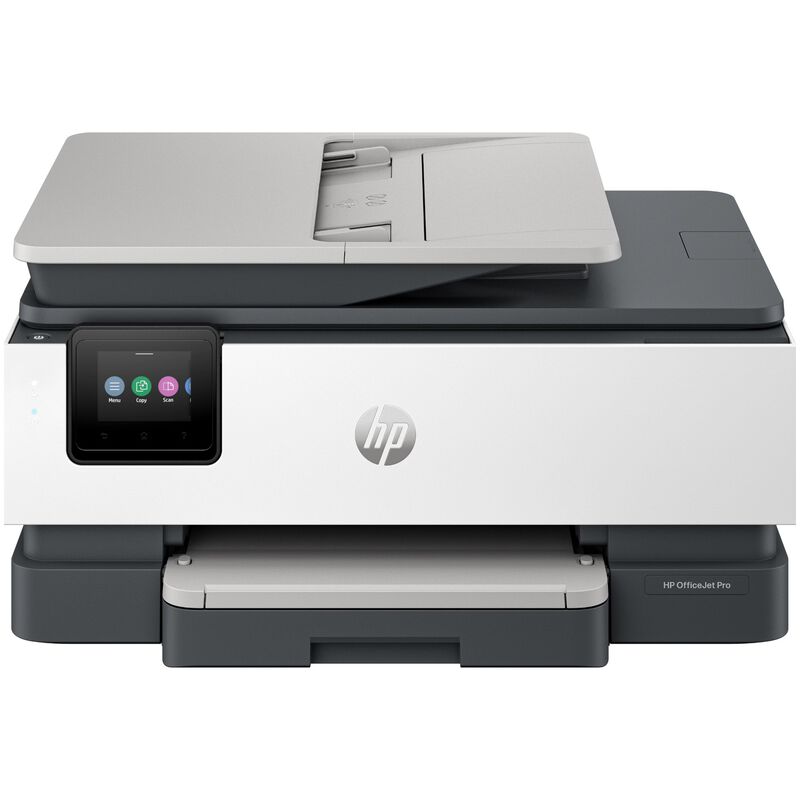
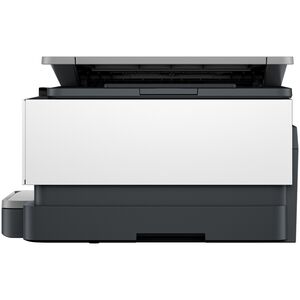
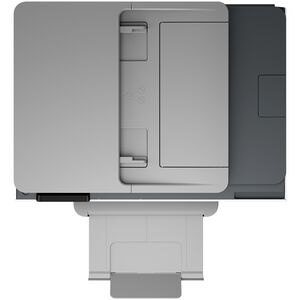
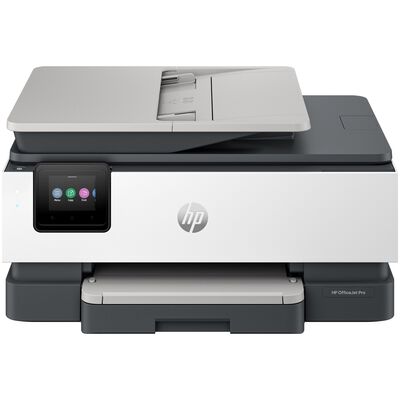
HP OfficeJet Pro 8135 All-in-One Printer

MODEL:

OJPRO8135

MPN:

C2VK1A#B1H
3.4 out of 5 Customer Rating
HP OfficeJet Pro 8135 All-in-One Printer is rated 4.7 out of 5 by 15.
  • y_2026, m_8, d_3, h_10
  • bvseo_bulk, prod_bvrr, vn_bulk_3.0.48
  • cp_1, bvpage1
  • co_hasreviews, tv_1, tr_14
  • loc_en_US, sid_OJPRO8135, prod, sort_[SortEntry(order=RATING, direction=DESCENDING), SortEntry(order=SUBMISSION_TIME, direction=DESCENDING)]
  • clientName_pcrichardson
  • bvseo_sdk, dw_cartridge, 18.2.0, p_sdk_3.2.0
  • CLOUD, getAggregateRating, 9ms
  • reviews, product
$159.99 Price reduced from $239.99 to
Save $80 (33% Off)
Low Price Guarantee

BUY NOW, PAY LATER WITH . See if you qualify


Delivery & Pickup Options

Delivery to 43215 Change
Parcel Delivery
Will ship by Wed, Aug 5 FREE
Learn More

About this Item

Printing Technology
Inkjet
Max Print Resolution (Color)
4800 X 1200 DPI
Buffer Memory
512 MB Buffer
Paper Feed
Top and Front Paper Feed
Maximum Paper Width
8.5" Max Paper Width
Paper Tray Capacity
225 Sheet Capacity
Envelope Printing
Yes
Ports
Ethernet and USB Ports
Wireless Printing
802.11ac Wireless
Fax Speed
4 Seconds Per Page
Copy Resolution
600 X 600 DPI Copy Resolution
Color Scanning
Yes
Max Print Resolution (Black)
1200 X 1200 DPI
Cartridge Model Numbers
HP 923 Black Original Ink Cartridge (~500 pages) 4K0T3LN; HP 923 Cyan Original Ink Cartridge (~400 pages) 4K0T0LN; HP 923 Magenta Original Ink Cartridge (~400 pages) 4K0T1LN; HP 923 Yellow Original Ink Cartridge (~400 pages) 4K0T2LN. HP EvoMore planned to be available April 2024: HP 923e EvoMore Black Original Ink Cartridge (~1,000 pages) 4K0T7LN; HP 923e EvoMore Cyan Original Ink Cartridge (~800 pages) 4K0T4LN; HP 923e EvoMore Magenta Original Ink Cartridge (~800 pages) 4K0T5LN; HP 923e EvoMore Yellow Original Ink Cartridge (~800 pages) 4K0T6LN. Actual yield varies considerably based on content of printed pages and other factors
Included Software
HP Printer Software
System Requirements
Windows 11; Windows 10; macOS 11 Big Sur; macOS 12 Monterey; macOS 13 Ventura; macOS 14 Sonoma; Linux; Chrome OS
Additional Features
Tackle home office tasks with an all-in-one printer print, scan, copy and fax. Scan business receipts or save documents to popular cloud apps with the HP app. Stay connected with reliable, dual-band Wi-Fi. Quickly navigate tasks with a 2.7 color touchscreen. Print directly from your USB drive for quick, convenient document access. HP Wolf Essential Security helps protect your device and data from threats.
Dimensions
18.1(w) X 9.1(h) X 13.2(d)
Rated 5 out of 5 by from Crisp and Quick [This review was collected as part of a promotion.] The HP Officejet Pro 8139 All-in-One Printer is very easy to set up and works great. Set up is easy using your phone. You scan a QR code and start in your browser, setting everything up. Then you switch to the HP app to complete the setup. The print quality is great. It is neat and clean. I really like that they went to single ink cartridges for each color instead of the Tri-color cartridge and black cartridge. And the printing speed is excellent.
Date published: 2026-07-21
Rated 5 out of 5 by from Great all in one printer! [This review was collected as part of a promotion.] Excellent printer, replacing another HP that finally bit the dust after almost 10 years. This is a very fast printer, with multiple options for quality, paper type and formats. The setup was vastly improved and easy to do, and the networking for Airprint was automatic. The ink cartridge setup is a bit weird but after watching the tutorial on it, easy to get seated. The scanning is great, and the utilitiy software is intuitive and effective. Pictures come out great on photo paper, and you cannot beat the speed to print.
Date published: 2026-07-21
Rated 5 out of 5 by from Worth It! Easy set up, price was great, fast printing.
Date published: 2026-07-09
Rated 5 out of 5 by from I love my Printer [This review was collected as part of a promotion.] I finally found a printer for my home that I love. This printer does everything I need it to do. The printing is clear and sharp. I enjoy that HP keeps track of my ink and ships when needed. Such a handy feature. I’ve never printed so much. The only thing I had trouble with was connecting to my laptop but that’s probably because I’m not very techy. Other than that setup was simple.
Date published: 2026-07-08
Rated 5 out of 5 by from Amazing print quality [This review was collected as part of a promotion.] The setup was really easy. There is a QR code on the printer box that you can scan and also a website that you can go to in order to follow along for the directions. Once you put in your language and country that you're in, everything is smooth sailing. I downloaded the HP app and from there it completed the software updates remotely. Removing the orange lids off the ink cartridges took a bit of elbow grease to push them off and some of the orange clips on the ink cartridges came off more easier than others. On your printer there's a button called supplies and once you press that it shows you how much ink remains in your cartridges. I love the print quality and now my daughter no longer has to go to the school to print her projects off and now she can use the home printer!
Date published: 2026-07-02
Rated 5 out of 5 by from Such an upgrade [This review was collected as part of a promotion.] I have had the printer now 3 weeks and am very impressed with its performance. Set up was simple and easy. The connectivity with the computers assigned to it have had no issues printing. We have only had to print a few documents but have to say that the quality is spectacular. My former printer would take at least 30 seconds to wirelessly receive the document before printing. This HP receives docs so fast and prints even faster
Date published: 2026-06-22
Rated 5 out of 5 by from Hardworking Printer [This review was collected as part of a promotion.] I was looking to replace a very old HP printer. The setup is easy. I’ve been using the HP OfficeJet Pro 8135 Printer, and overall it has been a solid printer for my home office. The wireless connection has been reliable so far, which makes it easy to print from my phone or computer. This is very important to me because several household members use the printer. The print quality is good and the colors are true. I also like that it includes automatic two-sided printing. This cuts down on my paper use and saves me money. The paper tray is large, so I do not have to refill paper constantly, and the print speed is fast enough. I do wish the printer was a bit smaller, but for the features it includes, the size is understandable. Overall, I would recommend the HP OfficeJet Pro 8135 Printer. It will definitely be great for anyone who needs a dependable all-in-one printer with wireless convenience, and useful office features.
Date published: 2026-06-18
Rated 5 out of 5 by from Love for Music [This review was collected as part of a promotion.] This 8135 Smart printer is just what the doctor ordered. I needed something that could Print, Copy and scan sheet music as well as collaborations with others even when I was away from home. I can send downloads to the printer remotely from my cell phone if needed. The set up was very easy and connection to my home Wi Fi and to my cell phone was a breeze. It fits in great on my computer desk and is a great compliment to my music creations as well as all necessary home and office document needs. I highly recommend this printer. HP has produced a winner once again.
Date published: 2026-06-18
Rated 5 out of 5 by from Wow, so nice. [This review was collected as part of a promotion.] I have always been an HP user this would be the second one I have owned and this sure was an upgrade. I love that it came with 12m of free ink subscription and the QR code helped me set this up with my phone with ease. This prints very fast and is so easy to set up. I love how crisp the images look and just how easy it is to print with any device because of the Bluetooth compatibility. I love that this does everything I need it to do from fax, scan, print and even copy. This ink lasts a long time and it fits the perfect amount of paper. This is super loud and it is also very light weight. I am very happy with this printer.
Date published: 2026-06-10
Rated 5 out of 5 by from HP OfficeJet Pro 8135 All-in-One Printer [This review was collected as part of a promotion.] Wow! I am so impressed with the HP OfficeJet Pro 8135!. The printer came well packed and ready to go. Once packing materials were removed, I plugged in the printer. At prompt, the ink cartridges (supplied) were installed. While the printer was preparing ink, I downloaded the HP app. Paper installed in paper tray, and WiFi easily connected. WiFi connection stays connected which is a relief as I am not too tech davy. I have used the printer many times, for a variety of projects including copying, faxing, printing photos and documents, and I am very pleased with the speed and quality of print. Colors are clear and bright, and ink dries quickly. HP delivers with the Pro OfficeJet 8135!
Date published: 2026-06-09
Rated 5 out of 5 by from Quality printing! [This review was collected as part of a promotion.] I like this HP Office Jet Pro printer, it is really a pro as it prints like a pro! The print quality is great! I love the additional features that will allow me to scan and fax from my printer right at home. The scan tray can take several papers at a time, and I like the tedious process of using a scan app on my phone, where I have to scan one page at a time. I haven’t used the fax feature yet, but I am certain it will come in handy when the need for faxing arises, and in the same way as the scan, I can upload multiple papers at a time for faxing and not one at a time. The printer is very compact, yet it has features that we had with our big printers at work. The setup part would have been awesome if not for the page alignment part that took forever. I had to turn off the printer after almost an hour of waiting before I was able to finish the setup. So if you run into any challenges similar to mine, I recommend simply turning it off and back on.
Date published: 2026-06-03
Rated 4 out of 5 by from Perfect too for home office [This review was collected as part of a promotion.] The HP OfficeJet Pro 8139 works great for my home office. I have had this printer for about a month and haven’t had any issues. The print quality and speed are more than sufficient for my needs. I routinely use the build-in scanner to scan to my phone, tablet, and computer. The copier works well and is quick. I find the touch screen controls to be intuitive and easy to navigate, however I do most of my navigation with the phone app. The ability to have an app made setup and modifying settings easy and relatively quick. I did have some initial connectivity issues during the setup process. After that it seems like the printer has been working well. This printer came with 12 months of HP’s instant ink feature, where ink will automatically be sent directly to my house. I was a little reluctant to try this feature, however with 1 year included, I figured why not. The subscription setup was easy. After the initial trial, I hope to have a better understanding of my usage and I can modify the subscription to meet my usage needs. Printing has been great, with quick printing, good quality, and no issues so far. I did have a small glitch with the instant ink not registering properly and temporarily blocking access to printing properly. This was fixed once I made sure everything was connected to the internet. One feature I really like is the ability to send a fax from the printer. With most people no longer having a traditional phone line, this is an unexpected by great feature. Overall, I have found this printer to be dependable, user‑friendly printer, and packed with great features. The Instant Ink will be nice, as I won’t have to worry about running out of ink any time soon. This printer offers great value
Date published: 2026-07-22
Rated 4 out of 5 by from HP Print [This review was collected as part of a promotion.] I never had an HP printer before this. As soon as it arrived, I was pleasantly surprised as to how light weight the product was. It was very easy getting it out of its box, with its included handles on the plastic wrap/baggy it was in which i very much appreciated! The setup and ink installation was a breeze. Only took less than 10 minutes to do everything. Scanned the QR code for the step by step guide, which was simple to follow. Got my HP app installed and ready to use. I love that i don't need a USB/Ethernet to use this printer, as im mostly going to stick with my phone app to access the printer, and I probably don't have open plug space on my computer any way. All in all, im a very happy HP printer gal!
Date published: 2026-07-18
Rated 4 out of 5 by from A Compact, Capable Printer That Shines After Setup [This review was collected as part of a promotion.] Setup took longer than I expected. The printer doesn’t include a USB cable for a hardwired first‑time connection, so you’re pushed into using the HP app right away. On my PC, the app was slow and struggled to complete the setup, and I eventually had to switch to my phone to finish the process. Not difficult, just more time‑consuming than other printers I’ve installed. The printer itself is lightweight. When removing the packing tape, the scanner lid actually popped off its hinge. It snapped back into place quickly, but it was surprising. Once everything was assembled and configured, though, the printer behaved normally. Printing performance is where this model shines. It prints quickly, the ink quality is crisp and vibrant, and everyday jobs run smoothly. The HP app becomes genuinely helpful once setup is complete, making printing from different devices easy. The ADF works without any issues. It’s a medium‑to‑small sized printer, so I wasn’t expecting enterprise‑level capacity, but it handles multi‑page scans and copies reliably for home‑office workloads. Overall, I’m giving it a 4 out of 5. The setup process could be smoother, but once it’s up and running, the printer delivers exactly what it promises: fast, clean prints, reliable feeding, and a convenient app experience.
Date published: 2026-07-07
  • y_2026, m_8, d_3, h_10
  • bvseo_bulk, prod_bvrr, vn_bulk_3.0.48
  • cp_1, bvpage1
  • co_hasreviews, tv_1, tr_14
  • loc_en_US, sid_OJPRO8135, prod, sort_[SortEntry(order=RATING, direction=DESCENDING), SortEntry(order=SUBMISSION_TIME, direction=DESCENDING)]
  • clientName_pcrichardson
  • bvseo_sdk, dw_cartridge, 18.2.0, p_sdk_3.2.0
  • CLOUD, getReviews, 6ms
  • reviews, product
  • bvseo_sdk, dw_cartridge, 18.2.0, p_sdk_3.2.0
  • CLOUD, getContent, 4ms
  • questions, product
  • bvseo-msg: Unsuccessful GET. status = 'ERROR', msg = 'Not Found.';