One TV Isn't Enough: How Sports Fans Set Up Multi-Screen Viewing
Posted on September 16, 2026 By Chris D.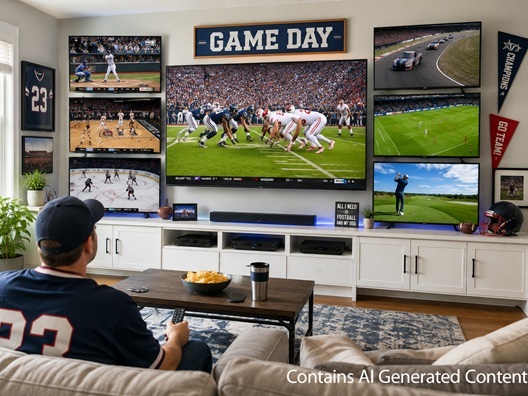
There is nothing quite like the electric energy of game day, though huge sports fans know the frustration of having a stacked Saturday afternoon schedule where three of your favorite teams are playing around the same time. Constantly flipping channels means you are almost guaranteed to miss a big play. If you never want to miss a moment, a multi-TV setup is the ultimate solution. With the right planning, you can easily create an immersive, theater-quality viewing environment right in your own home where you can watch multiple games at once.
In this guide, we will cover:
- Why upgrading to a multi-display setup enhances game day parties and solo marathons alike.
- How to choose the right display technologies, including high-brightness Mini-LED panels and wide-angle OLED TVs.
- Tips for mounting, viewing angles, and finding the perfect focal point for a balanced wall layout.
- How to handle increased outlet demands and conceal wires for a clean finish.
Why Have More Than One Screen?
Whether you’re hosting a watch party or settling in for a packed Sunday solo marathon, splitting your focus across a single screen isn’t always going to cut it. Stepping up to a multi-display home theater system completely changes your experience.
- Ultimate Solo Game Tracking: Aside from letting you watch more than one game at once, multiple TVs also allow you to track rival division games, monitor fantasy sports stats, and watch live analytical commentary simultaneously without ever losing sight of the main event.
- The Perfect Watch Party Dynamic: Why settle for only one game at your watch party? With a multi-TV setup, your guests can watch whichever team they root for. You can even set up something else on a separate screen for non-sports fans, like a gaming console. A multi-TV layout ensures that every fan gets a front-row seat to their preferred broadcast, keeping the entire party energized, engaged, and in the same room.
- Versatile Everyday Entertainment: When game day is over, a multi-display wall transitions beautifully into a functional media center where you can stream a movie on the primary screen while keeping video games or casual background streaming active on the secondary displays.
How To Make a Multi-TV Setup
Building a high-performance sports viewing environment requires selecting the right display tech to handle fast-paced motion and varied room lighting. Mixing and matching panel types strategically will give you the best performance for your budget.
- Anchor with a High-End Primary Display: Your central, largest TV should be a powerhouse capable of handling fast motion blur. Look for premium display features like a native 120Hz refresh rate and advanced panel technology, such as an OLED TV for cinematic, ink-black contrast levels in darker rooms, or a Micro RGB TV for jaw-dropping peak brightness that easily cuts through heavy afternoon sunlight.
- Quality Secondary Screens: Your side or accent TVs don't necessarily need the premium price tag of your main display, but they do need wide viewing angles so guests sitting on the edge of the couch can still see the score clearly. Look for crisp 4K resolution displays with excellent off-angle color retention so the action stays vivid from anywhere in the room.
- Match Your Aspect Ratios: To ensure a cohesive look across your entire entertainment wall, stick to standard 16:9 aspect ratio screens. This prevents awkward black bars around your sports broadcasts and keeps the video scaling perfectly uniform.
Placement
Where and how you position your TVs dictates the entire comfort level of your viewing space. You want to create an impressive visual array without causing major neck strain during a long double-header.
- The Classic Sports Bar Layout: You can always go with the tried and true "three-screen matrix," featuring one massive 65-inch TV or 75-inch TV mounted dead-center as your primary focus, flanked by two smaller 43-inch TV or 50-inch TVs side-by-side or stacked vertically on one side. Of course, these sizes can be adjusted depending on your budget and room size.
- Optimize Your Viewing Angles: To maintain total comfort during hours of viewing, ensure that the center of your primary screen sits near eye level when you are seated on your couch. Be sure your guests won’t need to tilt their heads to see the screen. Side screens should be angled slightly inward toward the center of the seating area to maximize visibility and eliminate glare. Take a look at our blog article TV Mounting Tips for Better Viewing Angles for some helpful details.
- Utilize Articulating Wall Mounts: Heavy-duty, full-motion TV mounts can be very helpful for a multi-screen setup. They allow you to pull the displays away from the wall, tilt them to eliminate reflections from windows, and realign them perfectly flush side-by-side for a seamless aesthetic. Fixed and tilting mounts can also be helpful, depending on your setup.
Wiring
An incredible multi-TV setup can quickly be ruined by a cluttered web of hanging power cords and HDMI cables. Managing your power infrastructure and signal distribution safely is the final step to a premium finish.
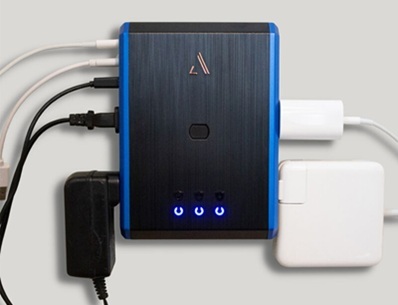
- Assess Your Power Load: Running three or four modern televisions along with soundbars and streaming media players increases the electrical demand on a single room. Make sure you are plugging your hardware into a high-joule premium surge protector rather than a basic extension cord to help safeguard your electronics from unexpected voltage spikes.
- Streamline Signal Distribution: Instead of juggling five different remotes and getting stressed out while a kickoff is happening, keep it simple. The easiest route is giving each TV its own dedicated streaming stick so you can control each screen independently. You can also get an HDMI matrix. This handy device connects all your video sources – like your cable box, Apple TV, and gaming console – into one central hub which then connects to all of your TVs. This allows you to choose exactly which game plays on which screen with a single remote. Please note that this setup may not work with every TV, so be sure to check yours before you commit to this!
- Clean and Concealed Cable Management: For a sleek, professional look without cutting directly into your drywall, utilize paintable on-wall cable raceways to bundle and hide hanging power cords along the baseboards. If you prefer a completely invisible look, you can consider utilizing a specialized, in-wall power extension kit that routes cables safely behind the plaster. Just be sure to follow all instructions and only use products specifically designed for going behind your walls. This may also require professional installation.
At the end of the day, upgrading your home entertainment space with a multi-TV setup is the ultimate gift to your inner sports fan. It completely removes the stress of missing plays, eliminates channel-flipping fatigue, and turns your living room into the premier destination for every major sporting event. By pairing high-brightness display technology with smart placement and clean cable management, you can build a versatile media center that keeps everyone entertained for hours. Gather your gear, map out your wall layout, and get ready to experience the season with a completely unparalleled view of the action!