Study Setup at Home: Tech and Comfort Tips That Actually Help
Posted on July 08, 2026 By Mike M.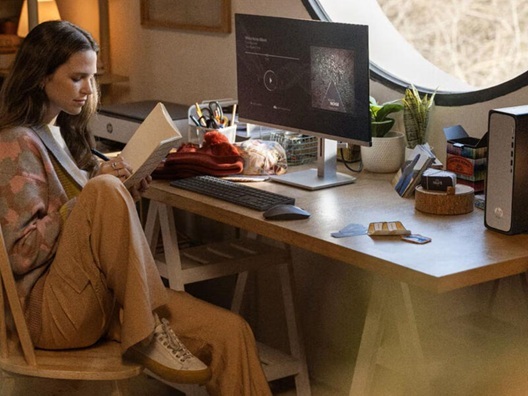
Creating an optimized home study space is essential for maximizing productivity, reducing physical fatigue, and enhancing cognitive focus. Whether you're prepping for university finals, working through an online certification or managing daily remote workflows, your environment directly impacts your brain's ability to retain information. By upgrading your computer hardware, desk geometry and ambient surroundings, you can transform a basic room into a high-performance study dojo that allows you to sustain deep focus.
In this guide, we will cover:
- Optimizing desktops, laptops, and peripheral accessories.
- Selecting the right chair and desk dimensions for physical comfort.
- Balancing task lighting and natural light to eliminate eye strain.
- Decluttering your workspace and integrating secondary research displays.
- Leveraging noise control and focus audio to eliminate mental distractions.
Computer Setup: Desktop, Laptop, and Accessories
Your computing hardware serves as the primary engine of your entire academic workflow, making its configuration the most critical element of your workspace architecture.
Desktop vs. Laptop
Choosing the right computer form factor depends entirely on your need for mobile flexibility versus high-efficiency processing power.
- The Desktop Advantage: A dedicated desktop PC offers superior processing speeds, easier hardware upgradability, and a more permanent and distraction-free destination for deep study blocks.
- The Laptop Benefit: A lightweight laptop provides unmatched portability, allowing you to seamlessly transition your work from your home desk to a library, classroom, or office.
- The Hybrid Solution: Combining both worlds by using a laptop as your mobile unit and plugging it into a dedicated docking station at home gives you an extremely flexible workstation.
The Right Accessories
The right computer accessories streamline your daily digital interactions, significantly accelerating your reading, writing, and research workflows.
- Multi-Monitor Configurations: Adding a dual-monitor setup or an ultrawide display increases your screen real estate, allowing you to view textbooks and research papers while writing documents without constant window-switching.
- Ergonomic Keyboards and Mice: Upgrading to a responsive mechanical keyboard and a quality mouse reduces repetitive strain on your wrists and fingers during marathon typing sessions.
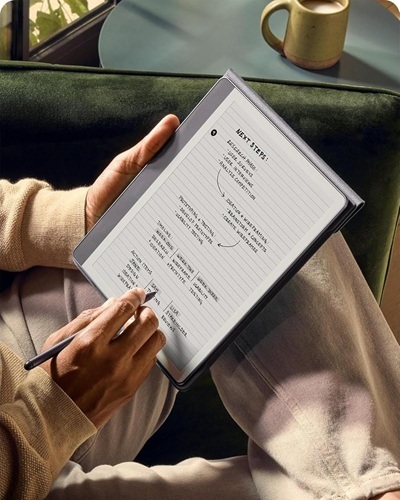
- Stylus and 2-in-1 Hybrids: Utilizing a digital stylus on a touchscreen monitor or a 2-in-1 hybrid laptop allows you to annotate PDFs, sketch diagrams, and take handwritten digital notes directly on your screen.
A Comfy Chair and Desk
Your physical furniture forms the structural base of your posture, directly dictating how long you can comfortably sit and work without experiencing back or neck pain.
- Ergonomic Computer Chair: Prioritize an adjustable office chair that features dedicated lumbar support, adjustable armrests, and a breathable mesh backrest to maintain comfort during marathon work sessions.
- Spacious Desk Surface: Select a desk with a wide, deep surface area that leaves open space in front of you for physical notebooks, reference documents, and your keyboard.
- Sit-to-Stand Versatility: Consider a height-adjustable standing desk to easily alternate between sitting and standing intervals throughout the day, which boosts circulation and defeats sluggishness.
Lighting and Visual Ergonomics
Proper lighting design is a heavily-overlooked factor that can affect your daily energy levels and visual comfort.
Task Lighting and Ambient Lighting
A balanced lighting ecosystem prevents your eyes from working too hard to adjust between a bright screen and a pitch-black room.
- Ambient Room Light: Keep your overall room brightness soft and evenly distributed using specific light bulbs or floor lamps to eliminate harsh, localized shadows.
- Focused Task Lighting: Use an adjustable desk lamp or a space-saving monitor light bar to cast bright, direct light downward onto your reading materials and keyboard without creating screen glare.
- Color Temperature Management: Use cool white light during daytime sessions to promote alertness, and switch to warm, amber light tones in the evening to protect your sleep hygiene and to start winding down.
Natural Lighting
Positioning your workspace to harness daylight can help you feel more focused, and it can help you stay positive even amongst a tidal wave of work.
- Boosting Daytime Focus: Exposure to natural window light helps you stay naturally energized without over-relying on caffeine.
- Strategic Desk Placement: Position your desk perpendicular to your windows rather than directly facing them or sitting directly in front of them to maximize daylight while preventing blinding glare on your monitor.
- Visual Breaks: Glancing out a window and focusing on a distant object for 20 seconds every 20 minutes allows your eye muscles to relax, preventing eyestrain when you're on a computer all day.
Desktop Organization
A cluttered workspace creates constant visual background noise, which can fragment your attention span and elevate stress levels.
Decluttering
Organizing your immediate physical surroundings is a prerequisite for unlocking sustained, distraction-free cognitive performance.
- Reducing Cognitive Load: A clean, clear desk surface acts as a visual reset button for your brain, making it significantly easier to dive straight into deep study blocks without mental friction.
- Smart Cable Management: Use under-desk cable trays, adhesive wire clips, and hook-and-loop straps to bundle messy power cords completely out of sight.
- The End-of-Day Routine: Spend two minutes at the end of every study session clearing away trash, wiping down your surfaces, and prepping your desk so it is completely ready for the next morning.
Secondary Tablets or Notebooks
Dividing your workspace into active production zones and passive reference zones keeps your main monitor uncluttered and your focus sharp.
- Dedicated Reference Screens: Using a secondary tablet allows you to keep textbook chapters or lecture slides constantly visible right next to your keyboard.
- Analog Note-Taking Separation: Keeping a physical notebook flat on your desk dedicated solely to sketching ideas or summarizing concepts keeps you from clicking away from your main research document.
- Smart Device Integration: Utilize cross-platform cloud applications to ensure the notes you scribble on your tablet sync instantly with your study files on your computer.
Audio Management
Controlling your acoustic environment is just as critical as managing your visual setup, especially when working in loud households, busy apartments, or a dorm.
Noise-Canceling Headphones
Acoustic isolation tools are the ultimate solution for establishing a private, distraction-free workspace anywhere.
- Blocking Ambient Noise: Premium noise cancelling headphones continuously neutralize low-frequency background sounds like HVAC hums, or household chatter.
- Sending a “Do Not Disturb” Message: Slipping on a dedicated pair of headphones sends an immediate visual cue to family members or roommates that you are in a deep focus zone and should not be interrupted.
- Ergonomic Earbud Alternatives: If you find heavy over-ear headphones uncomfortable for long periods, high-quality wireless earbuds with customizable silicone tips offer a lightweight, highly-breathable alternative.
White Noise and Focus Audio
When complete silence isn't possible or feels too sterile, engineered background audio can help stabilize your focus and mask jarring environmental sounds.
- The Power of Sound Masking: Continuous, steady audio frequencies like white noise can smooth out sudden acoustic spikes, preventing unexpected household sounds from breaking your concentration.
- Lo-Fi Beats: Instrumental playlists, ambient soundscapes, and lo-fi tracks provide a steady rhythmic backdrop that can stimulate focus.
- Regular Tunes: Everyone is different. If listening to your favorite artist's songs will help you stay locked in, more power to you. Listen on and get your grind going!
By anchoring your space with an ergonomic computer chair and desk, balancing your lighting and deploying acoustic tools, you build an environment where deep focus happens naturally. Ready to maximize your productivity? Pick one optimization from this guide to tackle today and feel the immediate difference in your daily focus!